![MasterLogo_DarkGreenZag_NoBackground.png]](https://my.zigzag.global/hs-fs/hubfs/MasterLogo_DarkGreenZag_NoBackground.png?height=30&name=MasterLogo_DarkGreenZag_NoBackground.png)
We've seen many clients come over from other returns apps where the returns center URL is the same as the previous provider. Follow the steps below to update your returns URL within Shopify.
Go to the home screen of the app and click the arrow next to Support.

To continue click Customize URL under the App proxy section:

That will bring up this box below:

If you've installed our App after using another providers, the current URL in that box may show as returns-1.
If you've deleted the other app, you can simply remove the -1. If you haven't deleted the other app, you will have to change the other returns portal URL first to -2 and then come back to this one and change to just returns.
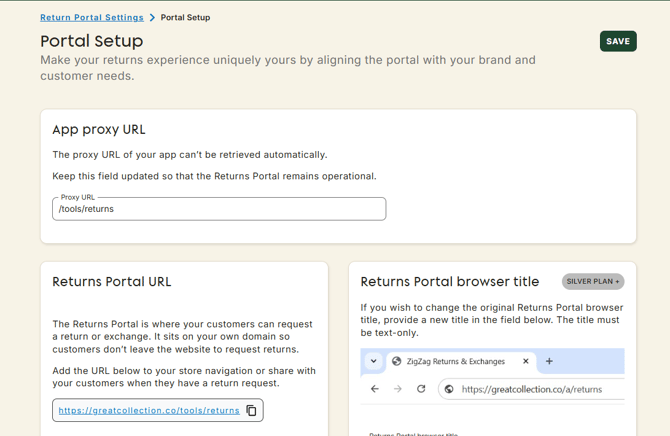
Please keep in mind that changes also need to be applied on the app otherwise the returns portal proxy won't work. Go to Return Portal Settings > Portal Setup page to make updates.