![MasterLogo_DarkGreenZag_NoBackground.png]](https://my.zigzag.global/hs-fs/hubfs/MasterLogo_DarkGreenZag_NoBackground.png?height=30&name=MasterLogo_DarkGreenZag_NoBackground.png)
ZigZag Returns & Exchanges supports USA-to-USA returns and allows you to configure automated USPS return labels directly in the app.
How to set up USPS return labels
To make USPS available for your US domestic returns:
- Go to Carriers and Labels in the app.
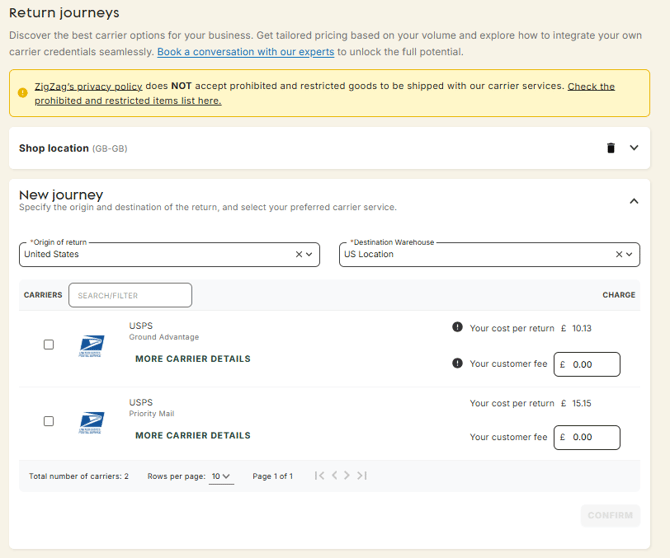
- Create a Return Journey with:
- Country of origin: USA
- Destination warehouse: a warehouse located in the USA
- Once the Return Journey is created, the available USPS services will appear.
- Select the USPS services you want to offer and activate them.
Once the services are activated, they will automatically become available to your customers in the Returns Portal when they create a return from a US address to a US warehouse.
How USPS return labels are charged
USPS return labels are provided at a flat rate, so the label cost does not vary based on where in the USA the return is being sent from.
The configured return journey determines which USPS services are available to your customers and the applicable return shipping cost.
No additional information is currently required to activate USPS services.