![MasterLogo_DarkGreenZag_NoBackground.png]](https://my.zigzag.global/hs-fs/hubfs/MasterLogo_DarkGreenZag_NoBackground.png?height=30&name=MasterLogo_DarkGreenZag_NoBackground.png)
How It Works
When a customer submits a return request:
- The system evaluates the return against your configured workflow rules.
- If the return matches an approval rule, it is automatically approved.
- If the return matches a rejection rule, it is automatically rejected.
- If no rule applies, the return remains in Pending Approval status for manual review.
Rule conditions
A rule condition is a combination of the selections you make to the property, operator and value fields.
Rule condition elements
Property
The property is what your rule is based on. The types of properties are Order gift card, From country, Return value, Return reason, Return option, Order was created, Order tags and Product tags.
|
Order Discount Code |
Use Order Discount Code card property if you have a discount campaign available like “BLACK for 40% off” |
|
From country |
Use From country property if you want to approve or reject returns from specific countries which do not comply with the conditions of your return policy. |
|
Return value |
Use Return value property if you want to approve or reject returns with a return value that is below or above a certain number. The Return value is the total sale cost of all items within a return request. The return value currency is inherited from the placed order. Eg. A return value of "50" will equal to £50, €50 or $50 depending on the order. |
|
Return reason |
Use the Return Reason property to approve or reject a return when the return reason selected by the customer is, or is not, a specific reason. |
|
Return option |
Use the Return option property to approve or reject a return based on the return option selected by the customer. |
|
Order was created |
Use the Order was created property to approve or reject a return based on when the order was created. You can configure the rule to apply to orders created before or after a specified number of days, weeks, or months. |
|
Order tags |
Use the Order Tags property to approve or reject a return based on whether specific tags are applied to the order. The condition can be configured to check whether a tag is present or not on the order. |
|
Product tags |
Use the Product tags property to approve or reject a return based on whether specific tags are applied to the returned product. The condition can be configured to check whether a tag is present or not on the product the customer is returning. |
Operator
The Operator options change depending on what Property type(s) you choose.
If you choose Order gift card, From country, Return reason, Return option, Order tags or Product tags, the operator dropdown options are:
- is
- is not
- is
- is not
- is greater than
- is less than
- more than
- less than
If you choose Return value, the operator dropdown options are:
If you choose Order was created, the operator dropdown options are:
Values
The Value can contain multiple options, and it depends on what Property was selected.
Check if an item has been auto approved or rejected
To check if an order has passed through an automated return rule:
- In the navigation bar, select Manage returns.
- Find and select the item you want to investigate.
The note at the top of the page states whether the item has been automatically approved or rejected.

Timeline
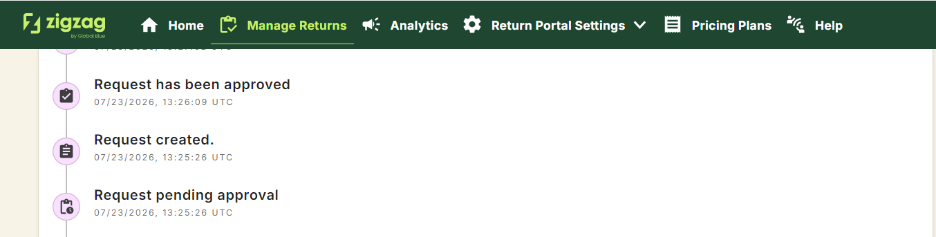
The Timeline page also shows whether an item has passed through Automated return processing.
Return rules priority
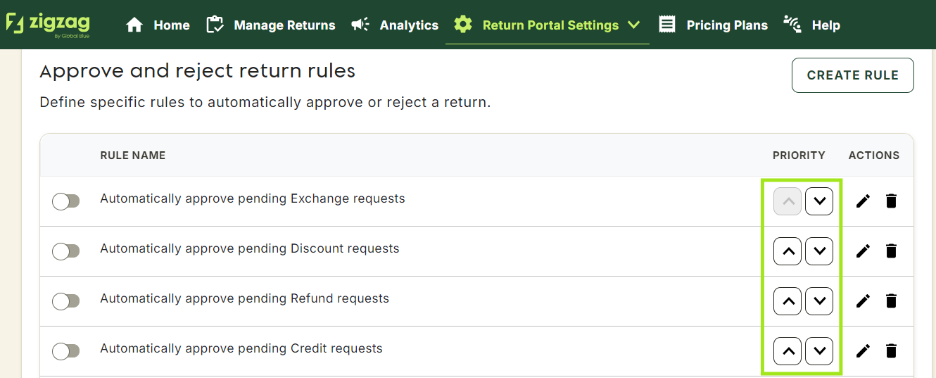
When you have multiple return rules, they will be prioritized based on their order - from top to bottom. If two or more return rules contradict each other, the rule higher in the order will be prioritized.
To reorder your rules, click the up and down arrows in the Order/Priority section.
Return rules examples
Below you can see some of the rule examples you can apply to automate your return requests.
Reject returns from specific countries
You can prevent your customers from making returns from countries which do not comply with the conditions of your return policy.
A single rule can be used to block returns from a single country, or multiple countries.
Eg.
If "Country" is "Netherlands" then "Reject return"
If "Country" is "France", "Spain", "Germany" then "Reject return"

Auto-approve if the item value is less than a set amount
Eg.
If "Return value" is less than "50.00" then "Approve return"
Auto-approve return based on Country
Approve return requests from specific countries.
Eg.
If "Country" is "United Kingdom" then "Approve return"
Rule combination - reject based on Country and Return value
Reject a return request if the country is Guernsey and if the return items' cost is more than 500.
Eg.
If "Country" is "Guernsey"
and
If "Return value" is greater than "500.00"
Then "Reject return"