![MasterLogo_DarkGreenZag_NoBackground.png]](https://my.zigzag.global/hs-fs/hubfs/MasterLogo_DarkGreenZag_NoBackground.png?height=30&name=MasterLogo_DarkGreenZag_NoBackground.png)
The Exchange for Different Product feature extends the standard exchange functionality by allowing customers to select any product from your online store as a replacement, instead of being limited to the same product or its variants.
This provides significantly more flexibility and improves customer satisfaction by enabling more convenient exchanges.
Overview
Previously, the app supported exchanges only for:
- The same product
- A different variant of that product (e.g., size or color)
With this feature enabled, customers can now:
- Search for and select any product available in the store
- Replace returned items with completely different products
Availability
This feature is available under the following conditions:
- Included in the Platinum plan only
- Requires “Exchange for same product (different variant)” to be enabled first
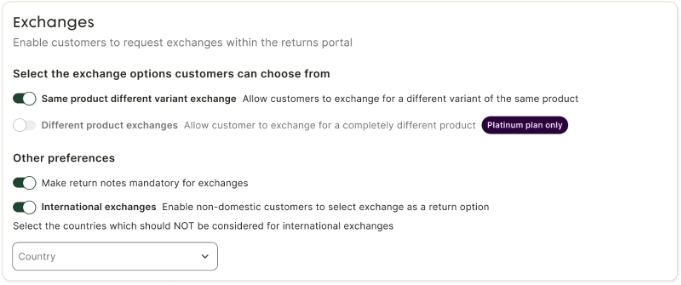
[Exchange configuration settings]
Configuration
Enable Different Product Exchange
To enable the feature:
- Navigate to Exchange Configuration in the app
- Ensure “Exchange for same variant” is enabled
- Enable “Exchange for different product” toggle
Once enabled:
- Customers can select products beyond the original item
- Additional UI elements become available in the portal and app
Optional: Enable “Redirect to Store”
An additional setting allows customers to browse products directly in your store:
- Toggle: “Redirect customers to the store”
- Available for Platinum plan users only
When enabled:
- Customers will see a “Browse store” button during exchange selection
- This provides a more visual and familiar product selection experience

[Browse store toggle in configuration]
Where This Feature Appears
The Different Product Exchange functionality is available across multiple areas:
- Returns Portal (Customer-facing)
- On the Return Options Page
- Within the Exchange product selection dropdown
- Return Request Page (Admin)
- When reviewing or editing an existing return
- You can modify the selected exchange product
- Manual Return Creation
- When creating returns directly in the app
- You can assign any product as an exchange item
Customer Experience
Step 1: Select Exchange Option
On the Return Options Page, the customer selects:
- Exchange as the return option
Step 2: Select Exchange Product
The Exchange product dropdown is expanded with additional capabilities.
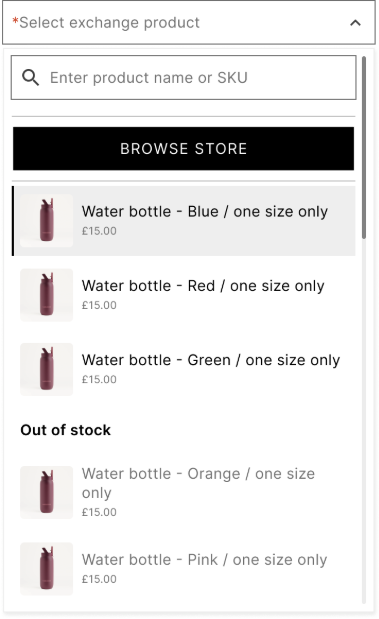
[Exchange dropdown with search field]
Search-Based Selection
Customers can:
- Search by product name
- Search by SKU
Search results include:
- Products currently available in the store
- Variants (if applicable)
Step 3: Browse Store (Optional Flow)
If “Redirect to store” is enabled, customers will also see a “Browse store” button.
Store Redirection Flow
- Customer clicks Browse store
- Customer is redirected to the online store
- Customer browses products as usual
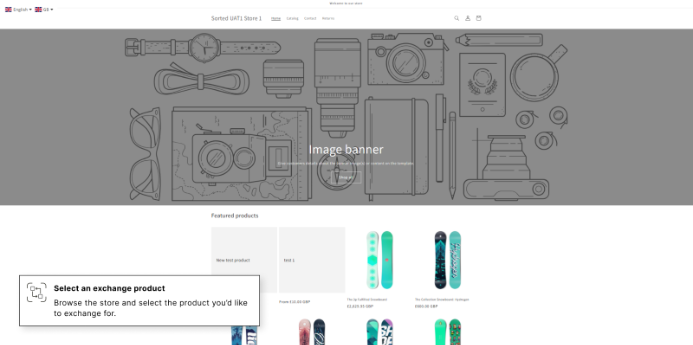
[Store view after redirection]
Product Selection Widget
Once a product is selected:
- A confirmation widget is displayed
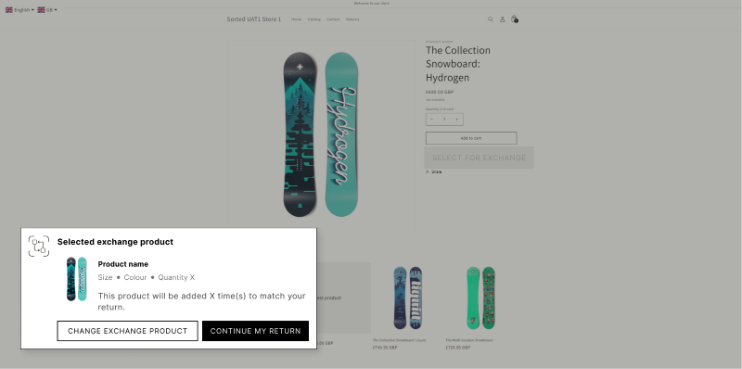
[Product selection confirmation widget]
Customers can:
- Confirm selection → return to portal with product applied
- Change selection → continue browsing
Step 4: Product Applied to Return
After confirmation:
- The selected product is automatically applied as the exchange item
- The customer is returned to the portal flow
Quantity Handling
The system automatically applies the same quantity as the returned item:
- If the customer returns 2 units
- The exchange product will also be set to quantity = 2
This behavior ensures consistency and prevents mismatches between return and exchange quantities.
Merchant Experience
Return Creation
When the return is submitted:
- Selected exchange products are saved in the system
- Products are marked as Exchange items
Return Request Page
On the Return Request Page, you can view:
- Exchange products in the Exchange Products table
- Full product details (name, variant, quantity, price)
Editing Exchange Products
If needed, you can:
- Modify the selected exchange product
- Use the same search functionality as in the portal
Behavior Summary
When Different Product Exchange is enabled:
- Customers are no longer limited to original product variants
- They can:
- Search the full catalog
- Or browse directly in the store (if enabled)
- Selected products are:
- Automatically linked to the return
- Applied with matching quantity
- Visible and editable in the return request page in the app
Key Benefits
For Customers
- Greater flexibility in exchanges
- Ability to choose preferred alternatives
- More intuitive product discovery (via search or store browsing)
For Businesses
- Increased customer satisfaction
- Reduced refund rates (customers more likely to exchange instead of refund)
- Better control via configuration
- Seamless integration with existing return workflows
Conclusion
The Exchange for Different Product feature significantly enhances the return experience by transforming exchanges into a flexible, customer-driven process.
Instead of being limited to product variants, customers can now select any item from the store, making exchanges more convenient and aligned with their preferences.
Combined with optional store redirection and full admin control, this feature provides a powerful and scalable solution for modern return management.