![MasterLogo_DarkGreenZag_NoBackground.png]](https://my.zigzag.global/hs-fs/hubfs/MasterLogo_DarkGreenZag_NoBackground.png?height=30&name=MasterLogo_DarkGreenZag_NoBackground.png)
Overview
ZZRE now allows you to create rules that automatically determine when a return should be offered with a 0 return fee.
This feature helps you provide free returns to specific customers, products, return scenarios, or other eligible cases without manually adjusting return fees.
Free returns rules work similarly to Advanced Workflows: you define specific conditions, and when a return matches those conditions, the selected action is automatically applied.
You can use Free returns rules to:
- offer free returns to your VIP customers;
- make specific return options free (for example, Exchanges);
- offer free returns for selected products or orders;
- create any other return fee exceptions based on your business needs.
- Product tags
- Order tags
- Customer tags
- Country of origin
- Return value
- Return reason
- Return option
- Order creation date
Please note: to use Free returns feature, you must subscribe to our Platinum pricing plan; the feature is not available for lower pricing plans.
Available conditions
You can create free return rules based on the following conditions:
How to set up Free returns rules
To create a Free returns rule:
- Go to Advanced workflows.
- Find the Free returns section.
- Click Create new rule.
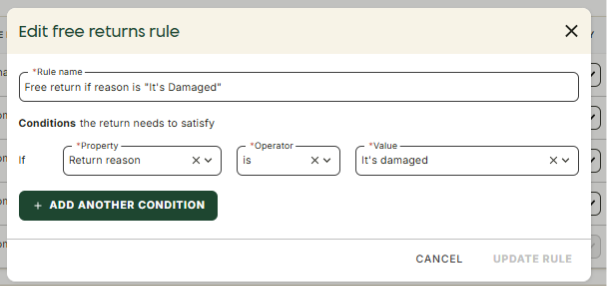
- Configure the rule:
- Enter a name for the rule.
- Select a condition.
- Select an operator.
- Select or enter the required value.
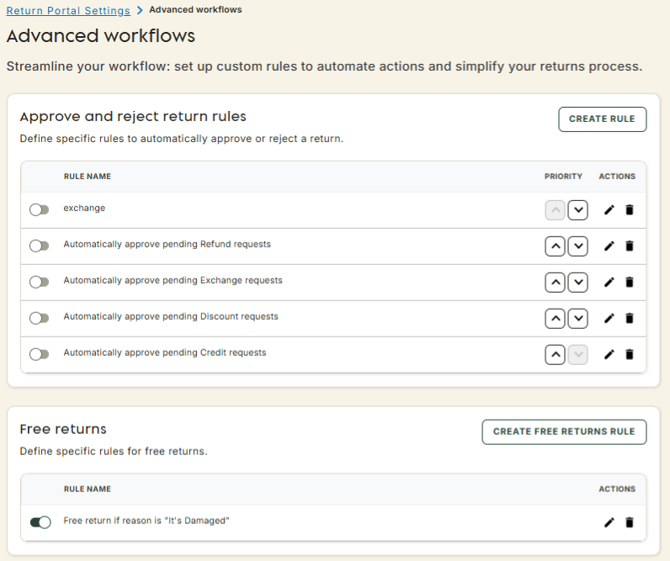
The action Do not apply return fee will be applied automatically for returns that match eligible free return rule.
Once created, you can:
- enable or disable the rule;
- edit an existing rule;
- delete a rule;
- create additional rules.
How does it work?
When a customer submits a return request, ZZRE checks all active Free returns rules.
If at least one rule matches the return, the return fee for all available carrier services will be set to 0 for the customer displayed on the Return method page. The return balance calculations will use a return fee value of 0.
Examples
Example 1 — Free returns for Exchanges
You want to offer free returns when customers choose an Exchange option.
Create a rule with:
- Condition: Return option
- Operator: Is
- Value: Exchange
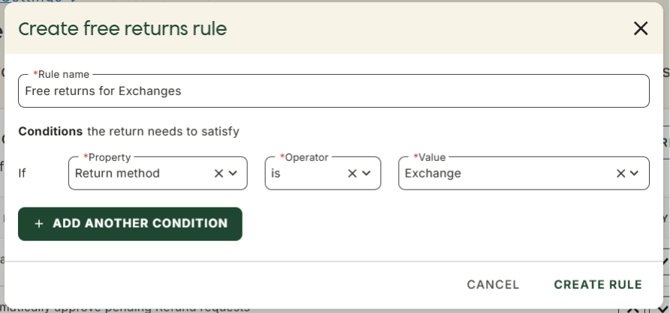
After saving and activating the rule, all Exchange returns will have a 0 return fee for all available carrier services.
Example 2 — Free returns for VIP customers
You want to offer free returns only to your VIP customers.
First, make sure your VIP customers have a specific customer tag in Shopify.
Create a rule with:
- Condition: Customer tag
- Operator: Is
- Value: VIP
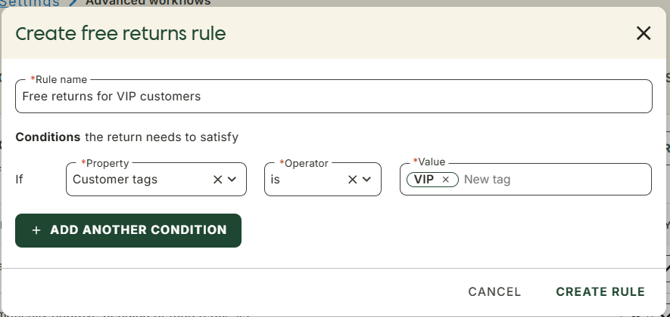
If you have multiple VIP customer tags, you can add multiple values to the same rule.
After saving and activating the rule, customers with the selected tags will receive the possibility to request free returns.
Example 3 — Free returns for marketplace orders
You want to offer free returns for orders received from a specific marketplace.
First, make sure such orders have a dedicated order tag in Shopify.
Create a rule with:
- Condition: Order tag
- Operator: Is
- Value: Marketplace
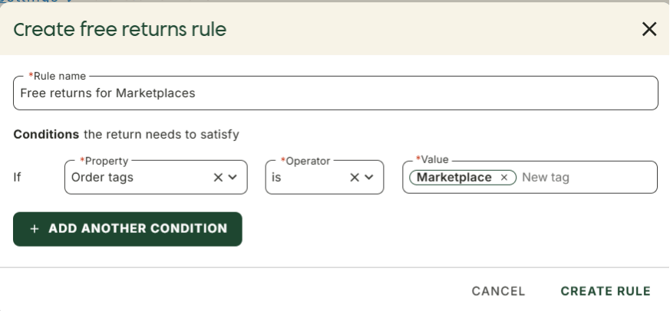
After saving and activating the rule, all returns created from orders with this tag will have a 0 return fee.
Important notes
Product tag rules
If you create a rule based on Product tags, the rule will apply when at least one returned product matches the selected tag.
Example:
- Return contains Product A and Product B.
- Product A has the "VIP product" tag.
- Product B does not have this tag.
- rules are checked according to their priority order;
- once a matching rule is found, the validation stops.
- all active rules are checked simultaneously;
- if at least one rule matches the return, the free return fee will be applied.
- Customer tag = VIP
- Free return
- Return value > $100
- Free return
The entire return will still qualify for a free return fee.
Multiple Free returns rules
Free returns rules work differently from Advanced Workflows.
For Advanced Workflows:
- rules are checked according to their priority order;
- once a matching rule is found, the validation stops.
For Free returns:
- all active rules are checked simultaneously;
- if at least one rule matches the return, the free return fee will be applied.
Example:
You have two active rules:
Rule 1
- Customer tag = VIP
- Free return
- Return value > $100
- Free return
Rule 2
A customer creates a return worth $50 and has the VIP tag.
Only Rule 1 matches, so the return is free.
A different customer creates a return worth $150 without the VIP tag.
Only Rule 2 matches, so the return is free.
A third customer creates a return worth $150 and has the VIP tag.
Both rules match, but the result is the same: the return fee is set to $0.
Summary
With ZZRE’s Free returns feature, now you can create flexible rules to automatically offer free returns to the customers and return scenarios that matter most to your business.
Whether you want to reward your VIP customers, encourage exchanges, support specific sales channels, or create your own return fee exceptions, Free returns gives you full control over when return fees should be waived — helping you create a better customer experience while keeping your return strategy aligned with your business goals.