![MasterLogo_DarkGreenZag_NoBackground.png]](https://my.zigzag.global/hs-fs/hubfs/MasterLogo_DarkGreenZag_NoBackground.png?height=30&name=MasterLogo_DarkGreenZag_NoBackground.png)
Overview
Stripe is a financial infrastructure platform and payment processor that enables businesses to securely accept online payments and manage financial operations through modern API integrations.
The integration between ZigZag Returns & Exchanges and Stripe extends your returns portal by allowing customers to complete required payments directly within the return journey. This removes the need for merchants to manually arrange payment collection outside the app, making returns, exchanges, and upsell scenarios significantly more seamless for both merchants and customers.
With Stripe enabled, ZigZag Returns & Exchanges can process payments for situations where a customer owes an additional amount as part of their return flow, including exchange requests where the replacement product is more expensive than the original returned item, configured return fees, and products selected through the Shop Now feature.
When payment is required, customers complete checkout directly within the returns portal before submitting their return request. This creates a single, uninterrupted return experience without the need to send separate invoices, create manual payment requests, or follow up with customers after submission.
Shopify Return Sync requirement for Stripe integration
To use Stripe payments within ZigZag Returns & Exchanges, Shopify Return Sync must be enabled.
This requirement exists because Stripe payments in ZigZag Returns & Exchanges are tightly connected to how returns are structured and managed in Shopify. When Return Sync is enabled, every return is created directly within the original Shopify order, ensuring a consistent link between the return, the order, and the associated payment flow. While draft order flow works for standard exchanges, it does not maintain a reliable connection between Shopify orders and Stripe transactions, which is required for full payment lifecycle handling.
To enable Shopify Return Sync:
- Open Returns Policy in ZigZag Returns & Exchanges.
- Scroll to the bottom of the page and locate Shopify Returns Integration.
- Enable the integration toggle.
- Save your changes.
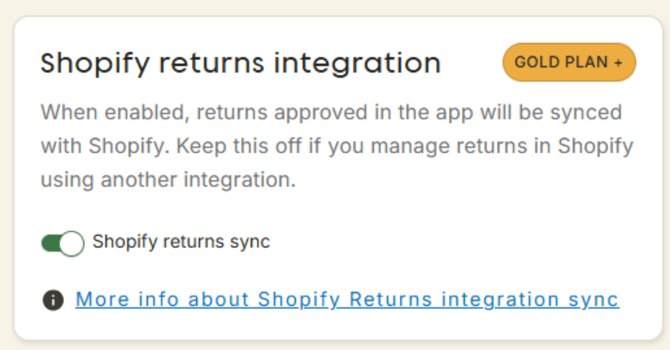
[Shopify Returns Sync toggle]
This structure is essential for handling payments processed via Stripe, including authorization, capture, and refund operations, as it ensures that all financial actions are correctly tied to the original order context.
Stripe payment processing in ZigZag Returns & Exchanges depends on maintaining a clear relationship between:
- the return request
- the original Shopify order
- the Stripe payment transaction (authorization and capture)
Shopify Return Sync ensures this relationship is preserved by anchoring each return directly to the original order in Shopify. This allows ZigZag Returns & Exchanges to accurately process Stripe payments and maintain correct financial state across all return stages.
When Return Sync is disabled and draft orders are used instead, this connection is not fully preserved, which limits the ability to reliably handle Stripe-based payment scenarios.
Connecting your Stripe account
ZigZag Returns & Exchanges uses Stripe Hosted Onboarding to securely connect your business to Stripe.
To begin setup, navigate to Returns Portal Settings → Integrations, locate the Stripe integration card, and select Connect. You will then be redirected to Stripe’s secure onboarding flow, where Stripe will guide you through account creation and business verification.
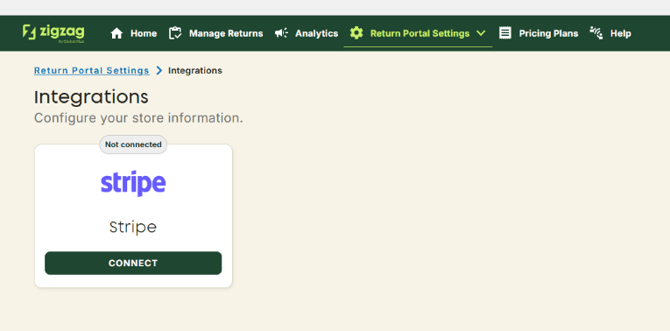
[Integrations page – Connect Stripe button]
If you already have a Stripe account, make a respective selection on Stripe onboarding flow
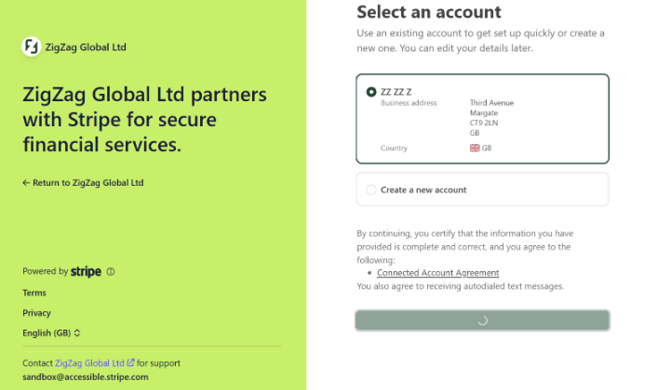
[Stripe onboarding form]
After submitting the onboarding form, Stripe performs a compliance and verification review. During this period, the integration status in ZigZag Returns & Exchanges changes from Not connected to In progress.
Once Stripe completes its review, one of two statuses will be shown:
Live indicates that verification has been completed successfully, and your Stripe account is fully active. Once the status becomes Live, Stripe payments can immediately be used within your returns portal.
Action required indicates that Stripe needs additional information or documentation before activation can be completed. In this case, you can open your Stripe Dashboard directly from the Stripe integration card to review the requested actions. Stripe may also send reminder emails regarding required onboarding steps.
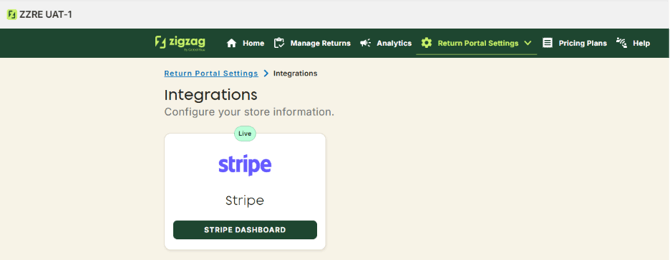
[Stripe onboarding statuses: Live]
When the integration reaches Live status, customers will automatically see a secure Stripe checkout page at the final step of the returns portal whenever payment is required for a return. You can open Stripe dashboard from the app by pressing the respective button to check the transactions and manage them directly there if needed.
How customer payments work
When a customer submits a return that requires payment, ZigZag Returns & Exchanges creates a payment record linked to that return.
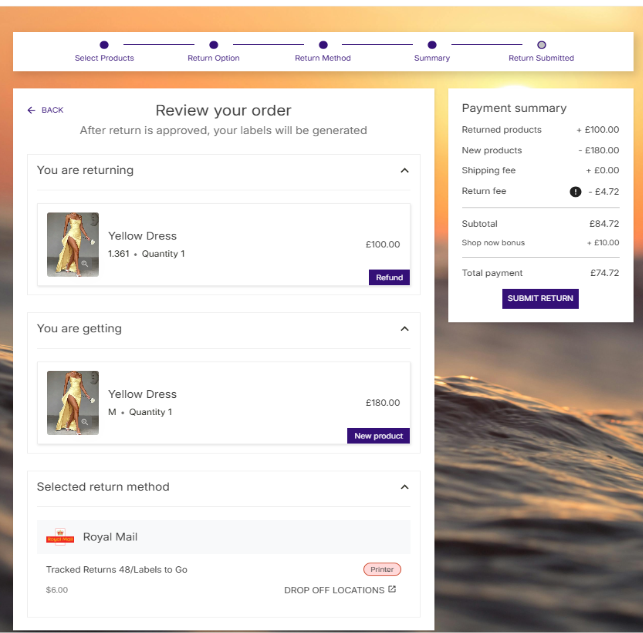
[Return summary page with payment required]
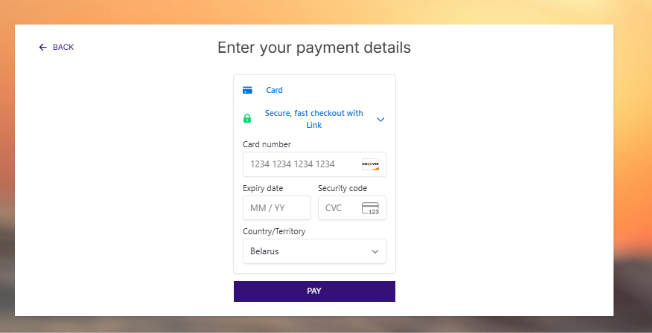
[Stripe customer checkout experience]
Opening the return in the Return Request page will show that the return contains an active payment, together with the current payment status and related payment information.
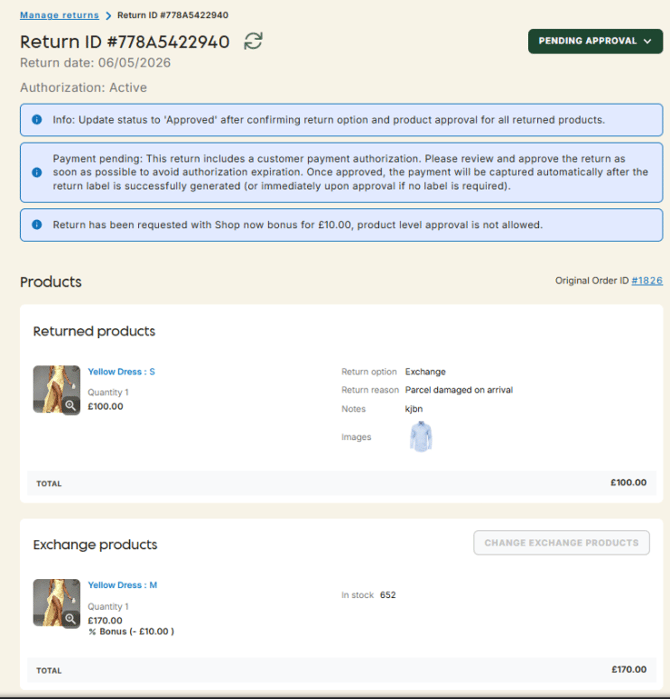
[Return Request page with active payment indicator]
Payments in ZigZag Returns & Exchanges follow Stripe’s standard authorization and capture model.
When the customer completes a checkout, the payment amount is initially authorized. This means the amount is reserved on the customer’s payment method, but funds are not yet transferred to your Stripe account.
Funds are transferred only after the payment is captured.
Capture happens automatically when the return is approved and one of the following conditions is met:
- a return label is successfully generated, or
- the return is approved without label generation.
If a return is rejected before capture occurs, the payment authorization is automatically voided, and the reserved funds are released back to the customer.
Stripe authorizations are typically valid for 7 days, so returns that contain payments should be reviewed promptly. If capture is not completed within the authorization window, the authorization expires, and payment can no longer be captured. In this scenario, payment collection must be arranged outside ZigZag Returns & Exchanges (for example by sending a separate invoice directly to the customer).
Please note that once capture occurs, Stripe deducts its transaction processing fee from the captured amount before settlement. Information about captured amounts and deducted fees is displayed on the Return Request page for full payment visibility.
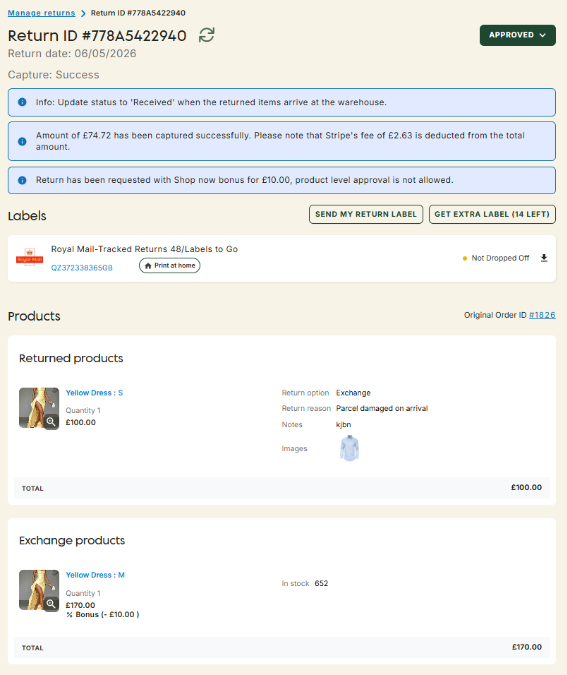
[Payment captured state]
Refunding customer payments
Captured Stripe payments can also be refunded directly through ZigZag Returns & Exchanges.
During return processing, within the Return Summary section, you will find the Customer’s payment field. This field defaults to zero and can be manually updated with the amount you wish to refund, up to the amount originally captured.
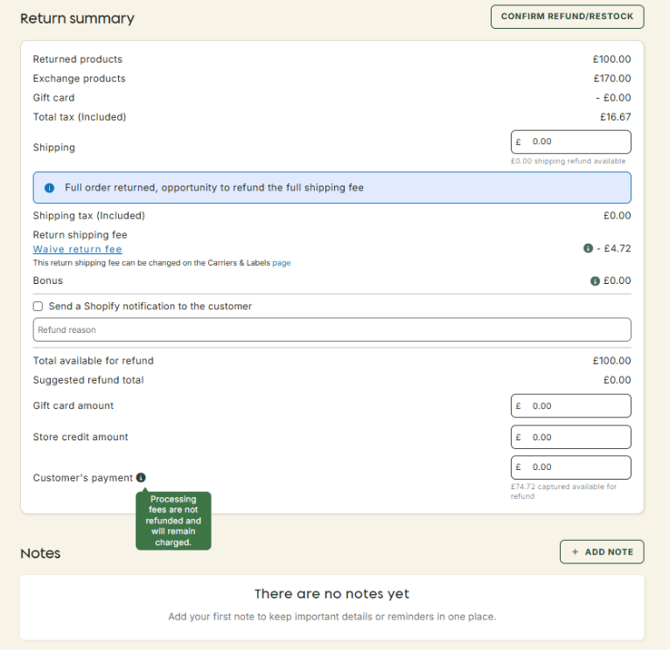
[Refund Summary / Customer payment field]
This is particularly useful in cases where an exchange cannot be fulfilled, when the customer decides to cancel their return after payment has already been captured, or when a return label is never used, and payment should be returned.
Please note that Stripe transaction fees are not refunded by Stripe.
Managing returns with payments
ZigZag Returns & Exchanges creates the return directly in Shopify against the original order. In this scenario, the original order may contain multiple unrelated transactions, and Shopify does not allow marking only part of an order as paid. Because of this, ZigZag Returns & Exchanges cannot safely mark the original order as paid automatically.
Instead, you’ll be reminded on the Return Request page to manually mark the order as paid once there are no pending payment balances remaining on that order.
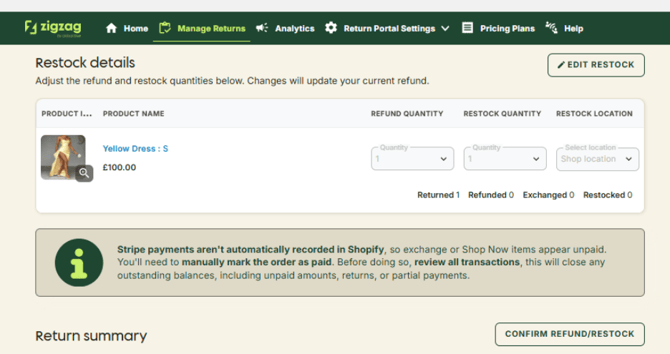
[Manual payment reminder on Return Request page]
To improve visibility, ZigZag Returns & Exchanges records Stripe payment details in the related Shopify order notes and timeline so you can identify captured payments, payment amounts, and transaction references.
Important note about follow-up returns
A follow-up return happens when your customer requests a return for items that were previously received through an Exchange or Shop Now flow.
In some of these cases, the customer may have paid an additional amount via Stripe during the original return flow, for example, when the selected Exchange or Shop Now products were more expensive than the returned items.
This creates a special refund scenario.
Because the additional payment was collected through Stripe and later reflected in Shopify as a manually paid order, Shopify cannot automatically route a follow-up refund back to that Stripe payment through ZigZag Returns & Exchanges.
As a result, Refund to original payment method is not fully automated for follow-up returns involving Stripe-paid items.
Instead, the refund may need to be split between:
- the original payment method used when the customer first purchased the item, and
- the Stripe payment collected during the original Exchange or Shop Now return flow.
The portion related to the Stripe payment must be refunded manually through your Stripe Dashboard, while the remaining refund amount can be processed in ZigZag Returns & Exchanges using the standard refund flow.
How to refund the Stripe payment portion
First, locate the original return in Shopify and open the related order note added by ZigZag Returns & Exchanges. This note contains the Stripe Transaction ID associated with the captured payment.
Next, open your Stripe Dashboard and navigate to Transactions.
Search for the Transaction ID from the Shopify note and open the matching transaction.
Select Refund, then enter the amount you want to refund. This may be the full captured amount or only a partial amount, depending on how many items are being returned and the amount allocated to the Stripe payment portion.
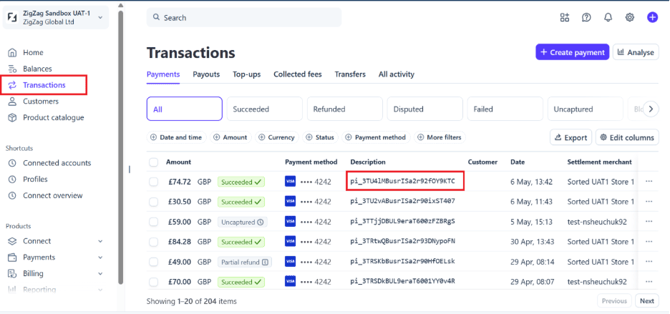
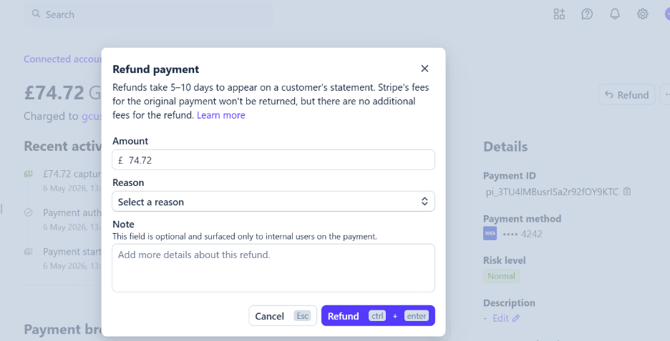
[Manual refund via Stripe Dashboard]
After processing the Stripe refund, complete any remaining refund amount through ZigZag Returns & Exchanges using the standard refund flow connected to Shopify.
Please make sure that the combined amount refunded through ZigZag Returns & Exchanges and through Stripe Dashboard does not exceed the total refund amount requested by the customer.
Availability
Stripe integration, including onboarding, customer checkout, payment capture, and Stripe refunds, is available exclusively for Platinum pricing plan.
If Stripe onboarding has already been completed and your pricing plan is later downgraded below Platinum, payment management features become unavailable. This includes showing Stripe checkout for new returns, capturing authorized payments, and processing Stripe refunds for existing payment-enabled returns.
Payment processing will also become unavailable whenever the Stripe integration status changes to Action required until the required actions are completed in Stripe.
Conclusion
The Stripe integration transforms ZigZag Returns & Exchanges from a returns platform into a complete returns and payment management solution.
By allowing customers to pay directly within the return journey, merchants can remove manual invoicing, reduce operational follow-up, speed up exchange processing, and create a significantly smoother customer experience. Payment authorization and capture workflows help ensure merchants retain control over fulfillment timing, while built-in refund capabilities provide flexibility when return outcomes change.
Combined with clear Shopify order visibility, timeline tracking, and automated payment handling, Stripe integration enables merchants to manage complex paid return scenarios confidently and at scale—all within a single operational workflow.