![MasterLogo_DarkGreenZag_NoBackground.png]](https://my.zigzag.global/hs-fs/hubfs/MasterLogo_DarkGreenZag_NoBackground.png?height=30&name=MasterLogo_DarkGreenZag_NoBackground.png)
The Shop Later feature allows your customers to use returned funds for future purchases. It consolidates return options such as Store Credit and Gift Cards, along with related settings in the app. By offering these options, you can retain sales, preserve revenue, and reduce the need to issue refunds to the original payment method.
You can also configure bonuses to make these options more attractive, encouraging customers to choose Store Credit or Gift Cards instead of a direct refund.
Gift Cards
The app’s Gift Card return option is represented as a discount code that is generated by the app and sent to your customer when a return is processed with this method.
Note: The term “Gift Card” is used for familiarity; it does not issue Shopify’s native Gift Card.
Gift Cards are available for Silver and higher pricing plans and can be enabled on the Refund Configurations page in the app. Once enabled, your customers will see Gift Card as a return option on the Refund Method page of the returns portal. When selected, the Return Summary page will show this option under the total refund line.
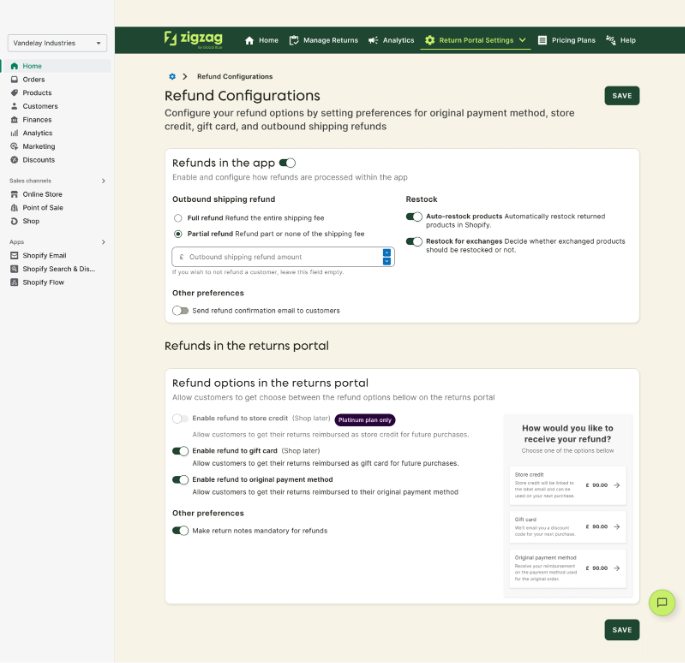
Gift Card and Store credit toggles in Refund Configurations page
How it Works
When a customer selects Gift Card as a return method:
- The return must be approved and marked as received.
- You can manage restock quantities and refund amounts in the Restock Details table. The app supports partial refunds, and you can enter a manual refund amount, which cannot exceed the total available refund.
- When you press Confirm Refund / Restock, the app:
- Generates a discount code for the approved refund amount.
- Sends the discount code to the customer via email.
- Marks the refund as complete for accounting purposes.
The discount code can then be used by your customer for future purchases, helping you retain revenue within your store.
Store Credit
Store Credit works similarly to Gift Cards but is a native Shopify feature. It allows you to issue a monetary balance directly to a customer account, which functions as a digital wallet. Store Credit can be used for future purchases, helping you increase customer retention and loyalty.
Setting Up Store Credit in Shopify
To use Store Credit, you must first enable New Customer Accounts in Shopify and activate the Store Credit toggle:
- Navigate to Settings > Customer Accounts in Shopify admin and enable new customer accounts.
- In the Customer Accounts section, toggle Store Credit on.
- Ensure that your customer sign-in experience allows customers to view their balance.
Once Store Credit is activated in Shopify, you can enable it in the app under Refund Configurations (the same as Gift card option).
Note: Store Credit is available for Platinum plan users only.
Once enabled, your customers will see Store Credit as a return option in the portal. After a return is approved and processed, the Store Credit balance is automatically updated in the customer account.
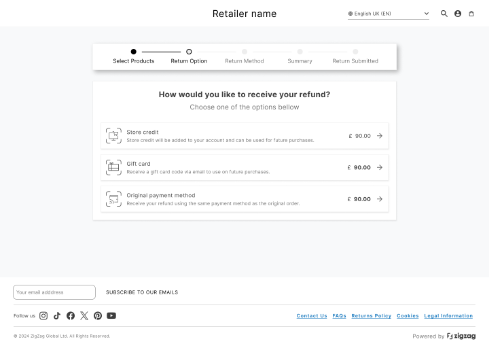
Refund Method page showing Store Credit option
Bonuses for Gift Cards and Store Credit
To encourage your customers to select Gift Cards or Store Credit instead of refunding to the original payment method, you can configure additional bonuses. These bonuses are added to the returned amount, making these options more appealing.
Configuring Bonuses
- Set a minimum refundable amount that triggers the bonus. This prevents bonuses from being applied to very small returns, which could result in disproportionate refunds.
- Select the bonus calculation method, choosing from three options:
- Flat Amount – Adds a fixed bonus to the refund.
Example: Refund £100, bonus £10 → Total offered = £110.
- Percentage of Return – Adds a percentage of the refund amount.
Example: Refund £100, bonus 20% → Total offered = £120.
- Combined Logic – Uses a percentage of the refund up to a threshold, then adds a fixed amount beyond that.
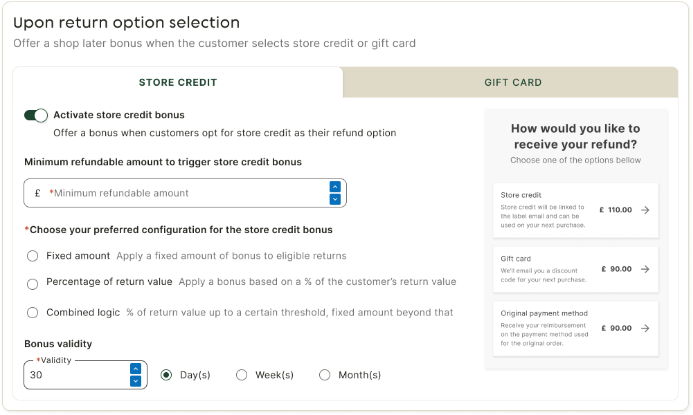
Bonus configuration settings
Why Minimum Refundable Amount Matters
It is important to configure the minimum refundable amount and bonuses carefully to avoid offering disproportionate bonuses. For example, if the minimum refundable amount is set to £5 but the flat bonus is £10, a return of £5 would result in a total refund of £15, which may be more than intended. To avoid this, configure your minimum refundable amount so that bonuses are not triggered for low-value returns.
What Your Customers See
When a bonus is applicable, the Refund Method page shows the total refund including the bonus. The Return Summary page also displays the selected refund method and the bonus amount.
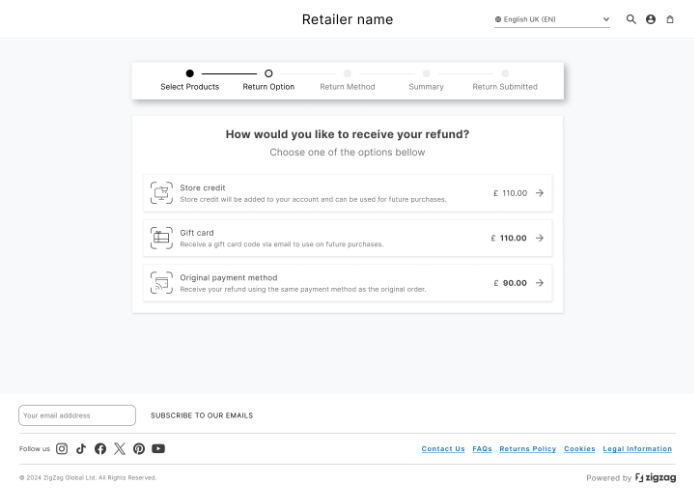
Refund Method page showing bonus applied
Rules and Limitations
- Once a return with bonuses is submitted, you cannot change the return option.
- Refund amounts to the original payment method cannot be adjusted manually, ensuring the bonus amount remains consistent.
- If some items are rejected or partially restocked, the bonus is split proportionally across the processed items.
Example: Two products worth £70 and £30, bonus £10. If the £30 product is rejected, the remaining bonus = £7.
Currency Considerations
- Bonuses are configured in your store’s local currency.
- If the order was placed in a different currency, the app automatically converts the bonus to your customer’s currency using internal exchange rates.
- This ensures accurate bonus calculations and consistency in the customer-facing experience.
Conclusion
The Shop Later feature helps you retain revenue and encourage repeat purchases by offering your customers Gift Cards, Store Credit, and configurable bonuses.
With Shop Later, you can:
- Incentivize customers to make future purchases rather than requesting direct refunds.
- Retain revenue and improve cash flow.
- Ensure accurate and fair bonus application, even for partial returns or multiple currencies.
- Provide a seamless, customer-friendly return experience with clear incentives.
By enabling Shop Later, you turn returns into an opportunity to increase sales, loyalty, and long-term profitability.