![MasterLogo_DarkGreenZag_NoBackground.png]](https://my.zigzag.global/hs-fs/hubfs/MasterLogo_DarkGreenZag_NoBackground.png?height=30&name=MasterLogo_DarkGreenZag_NoBackground.png)
Overview
Shop Now is a conversion-focused feature in ZigZag Returns & Exchanges designed to help you retain revenue that might otherwise be lost through refunds.
Instead of completing a return with a refund, your customers can be encouraged to select new products from your online store during the return journey. To make this option more attractive, ZigZag Returns & Exchanges allows you to offer additional bonus credit on top of the customer’s refundable amount. This creates a stronger incentive for customers to choose replacement products rather than request money back, helping you preserve sales while improving the customer experience.
In practice, Shop Now transforms a refund opportunity into a new purchase opportunity, directly within the returns flow.
Feature availability
Shop Now is available on Platinum pricing plan only.
Once enabled, the feature becomes configurable through ZigZag Returns & Exchanges Returns Portal settings, where you can define when Shop Now should be offered, the minimum refund amount required to trigger it, and how promotional bonus credit should be calculated.
This gives you full flexibility to tailor Shop Now to your return strategy, commercial goals, and customer behavior.
Enabling the Shop Now App Embed
Before Shop Now can be used on the returns portal, you must enable the ZigZag Returns & Exchanges Shop Now App Embed in your Shopify theme settings.
The App Embed powers the connection between your returns portal and your online store, allowing customers to move seamlessly between both experiences during the Shop Now journey. It enables the Shop Now widget, keeps selected products in sync, and ensures customers can return to the returns portal to complete their request after shopping.
Without enabling the App Embed, customers will not be able to use the full Shop Now flow.
To enable the App Embed:
- Open your Shopify Admin.
- Go to Sales Channels → Online Store → Themes.
- Locate the theme currently used by your online store.
- Click Customize to open the theme editor.
- In the theme editor, open App embeds using the toggle icon in the top-left corner.
- Find ZigZag Returns & Exchanges Shop Now Shop Later in the list of available app embeds.
- Turn the toggle On to activate the extension.
- Click Save in the theme editor.
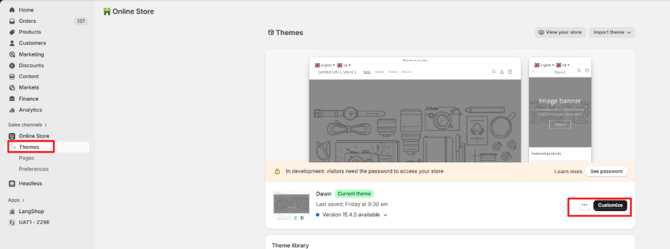
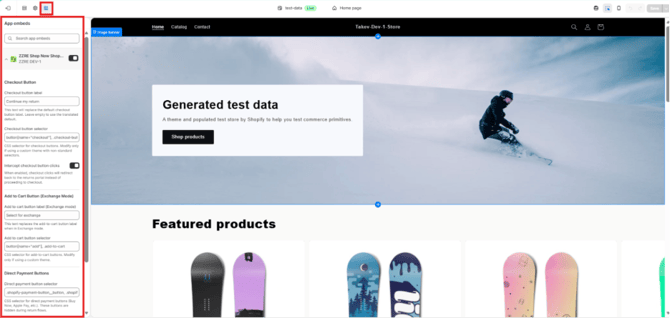
[Shopify Theme Editor / App Embeds / ZigZag Returns & Exchanges toggle enabled]
Once enabled, Shop Now will be fully operational and customers will be able to navigate between the returns portal and your online store as part of the Shop Now experience.
You can also expand the ZigZag Returns & Exchanges App Embed settings panel to customize customer-facing button labels and other display text shown during the Shop Now journey (see examples on the screenshot above). This allows you to align the experience with your brand voice and storefront messaging.
Enabling Shopify Return Sync
To use the full Shop Now experience, Shopify Return Sync must be enabled in ZigZag Returns & Exchanges.
This is a required setup step because Shop Now products are operationally treated as Exchange items, with any Shop Now bonus applied as a discount across those items. In some cases, customers may also need to make an additional payment when the value of selected Shop Now products exceeds their available Shop Now credit.
To ensure discounts, outstanding balances, and additional payments are reflected accurately, ZigZag Returns & Exchanges must create the return directly in Shopify against the original order.
This creates a single source of truth for managing Shop Now returns and provides a more consistent operational workflow for order management, fulfillment, reporting, and any potential follow-up returns in the future.
Without Shopify Return Sync enabled, the full Shop Now functionality will not be available.
To enable Shopify Return Sync:
- Open Returns Policy in ZigZag Returns & Exchanges.
- Scroll to the bottom of the page and locate Shopify Returns Integration.
- Enable the integration toggle.
- Save your changes.
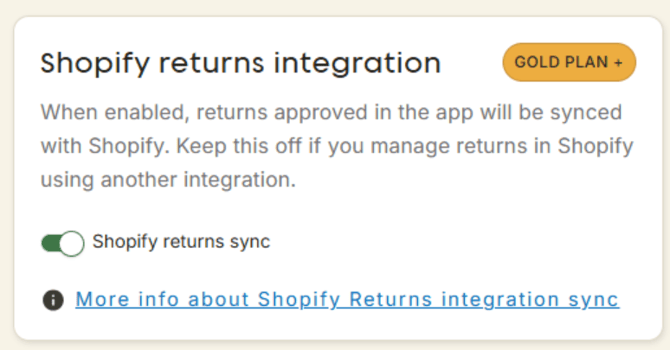
[Shopify Returns Sync toggle]
Once enabled, Shop Now returns will be created and managed directly within Shopify as part of the original order lifecycle, ensuring accurate financial and operational handling throughout the return journey.
Configuring Shop Now
To configure Shop Now, navigate to:
Returns Portal Settings → Return Options → Shop Now
Here you will find the Shop Now configuration card containing all feature settings.
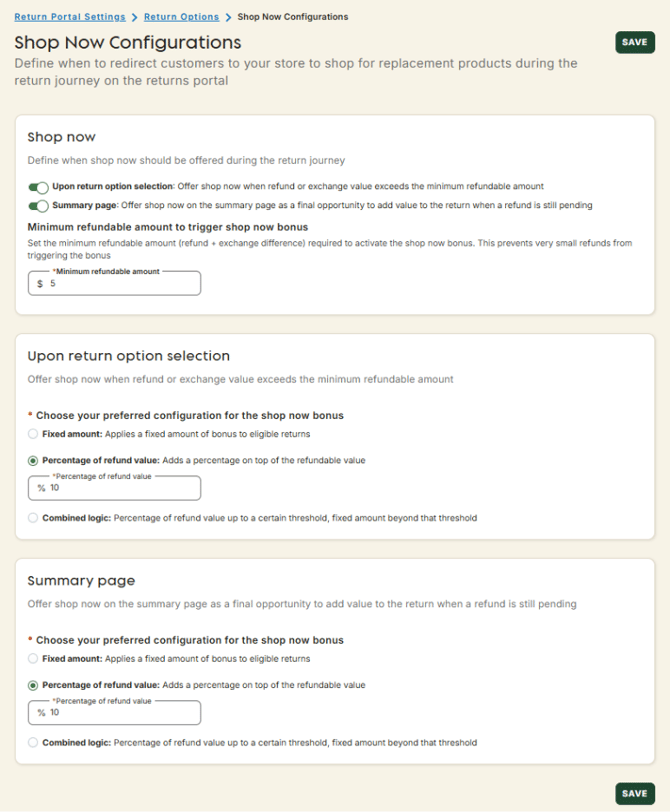
[Shop Now configuration page]
The configuration is built around three core elements: trigger timing, minimum refundable amount, and bonus calculation logic.
When Shop Now is triggered
Shop Now can be offered to customers at different stages of the return journey.
The first trigger option is Upon return option selection. With this setting enabled, Shop Now is presented immediately after the customer chooses the return option with their return and presses Continue.
This trigger becomes available when the customer is still entitled to receive money back, including cases where a standard refund is requested or when an exchange is selected but the replacement products cost less than the returned items, creating an outstanding refundable balance.
The second trigger option is On Summary page. This is a later-stage opportunity to present Shop Now, after the customer has progressed through the return flow and reached the Return Summary page.
This trigger is shown only when there is still an outstanding refund amount that is planned to be returned to the original payment method. If the customer has already chosen Store Credit or Gift Card as the refund method, Shop Now is not triggered, since the customer is no longer taking cash back out of your business.
Many businesses choose to enable both triggers, using the first as an early conversion opportunity and the second as a final attempt to save the sale.
Minimum refundable amount
You can configure the minimum refund amount required before Shop Now is offered.
This setting prevents Shop Now from appearing on very small-value returns where offering bonus credit may not make commercial sense.
For example, if the minimum refundable amount is configured as £50:
- a return with a refundable value of £50 will trigger Shop Now,
- a return with a refundable value of £60 will trigger Shop Now,
- a return with a refundable value of £49 will not trigger Shop Now.
The same logic applies when customers request exchanges that leave an outstanding refundable balance.
This setting ensures Shop Now appears only when the financial value of the return justifies the promotional incentive.
Configuring bonus credit
The main incentive behind Shop Now is bonus credit.
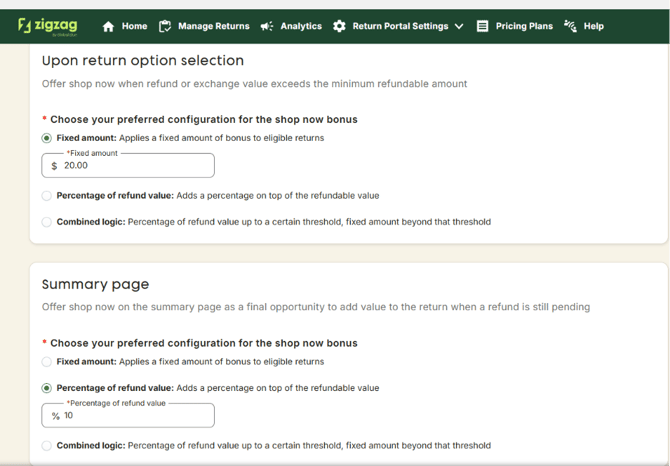
ZigZag Returns & Exchanges supports multiple calculation methods so you can choose the promotional strategy that best fits your business model.
[Bonus calculation settings]
A Fixed Amount bonus adds a static value to the customer’s available Shop Now credit, regardless of refund size.
For example, if the customer is entitled to a £100 refund and a fixed £20 Shop Now bonus is configured, the customer receives £120 total Shop Now credit, of which £20 is promotional bonus credit.
A Percentage of Refund Value bonus calculates the promotional amount as a percentage of the refundable balance.
For example, if the refundable amount is £110 and the configured bonus is 20%, the customer receives £132 total Shop Now credit, which includes £22 bonus credit.
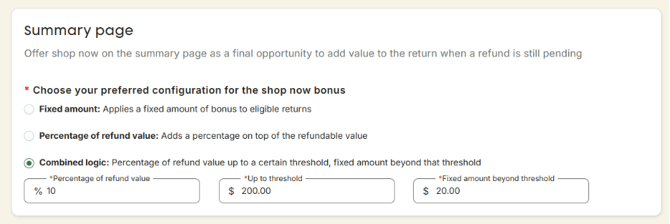
A Combined Logic bonus allows you to configure a hybrid model where bonus credit is calculated as a percentage up to a defined threshold, after which a fixed amount is applied. This provides greater flexibility if you want to reward smaller returns proportionally while capping incentives on larger returns.
[Bonus calculation – Combined logic]
The availability of bonus configuration options depends on which Shop Now triggers are enabled.
Once configured, Shop Now is automatically offered on the returns portal whenever the configured conditions are met.
Customer experience on the returns portal
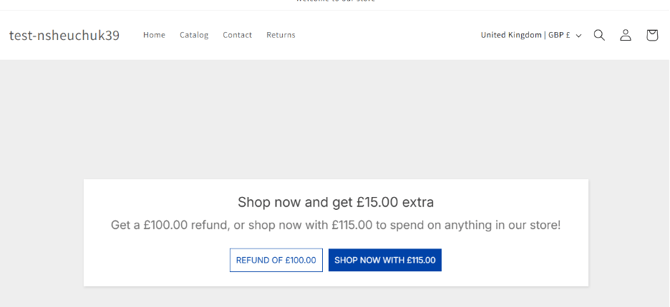
When Shop Now is triggered, customers are presented with a dedicated Shop Now page where they can decide whether to continue with a standard refund or accept the Shop Now offer.
If the customer chooses Refund, the normal refund flow continues.
If the customer accepts Shop Now, they are redirected to your online store to browse products.
[Shop Now offer page]
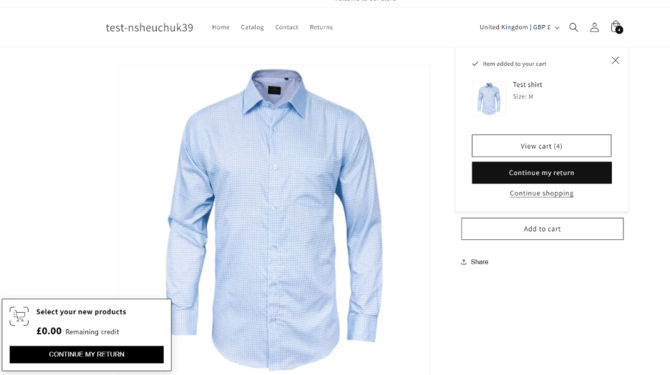
During shopping, a Shop Now widget is displayed showing the customer’s available credit balance. This balance includes:
- the original refundable amount, plus
- any configured Shop Now bonus.
Each time products are added to the cart, the available credit decreases accordingly.
If the customer selects products whose total exceeds the available credit, the remaining credit will display as 0, indicating all available Shop Now credit has been used and an additional payment may be required to complete the return.
[Shop Now widget]
Once the customer clicks Continue my return in the Shop Now widget, they are redirected back to the returns portal, where a Shop Now overview page displays all selected products, quantities, and the total credit used.
Customers can review their selection, update quantities, remove products, or choose Add more products to return to the online store and continue shopping before confirming their final Shop Now selection.
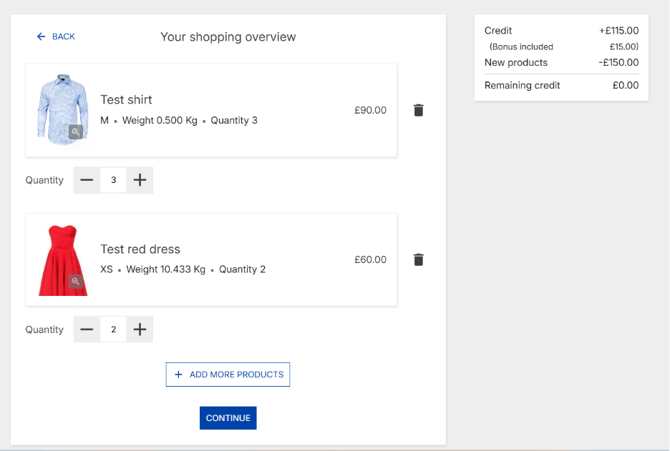
[Shop Now overview page]
How bonus credit is used
Bonus credit is applied only when the value of selected Shop Now products exceeds the customer’s original refundable amount.
There are three possible scenarios.
In the first scenario, full bonus usage, the customer selects products whose total value is equal to or greater than the original refund amount plus the full bonus amount.
For example, if the original refundable amount is £100 and the bonus is £20, selecting products worth £130 uses the full £20 bonus.
In the second scenario, partial bonus usage, the selected products exceed the original refundable amount but do not consume the entire bonus.
For example, if the original refundable amount is £100 and the bonus is £20, selecting products worth £110 uses only £10 bonus credit.
In the third scenario, no bonus usage, the selected products do not exceed the original refundable amount.
For example, if the original refundable amount is £100 and the customer selects products worth £100 or less, none of the promotional bonus is consumed.
Unused bonus credit is not refunded, converted to store credit, or paid out to the customer. It simply expires once the return is submitted. In such cases, customers will see a warning on Shop now overview page.
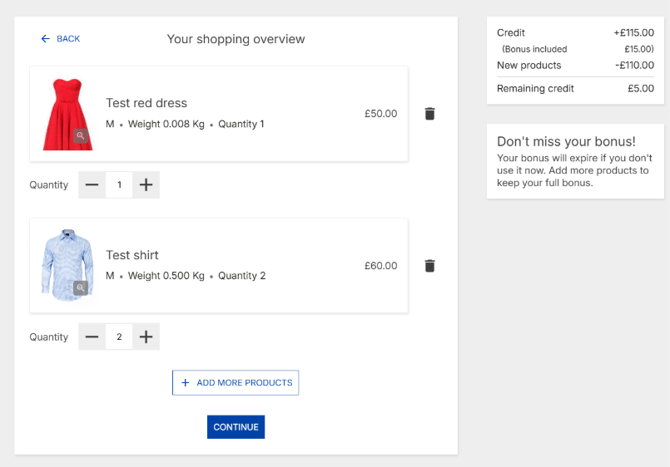
[Shop Now Overview where bonus is not fully used]
What happens next
After confirming Shop Now selections, the customer continues through the return flow.
If no bonus credit was used, the customer may still proceed through refund method selection because an outstanding refundable amount still exists.
If the customer chooses Refund to original payment method, Shop Now may be offered again on the Return Summary page as a final opportunity to retain the sale. For this reason, you may choose to configure a slightly stronger bonus offer for the Summary page trigger than for the earlier return option trigger.
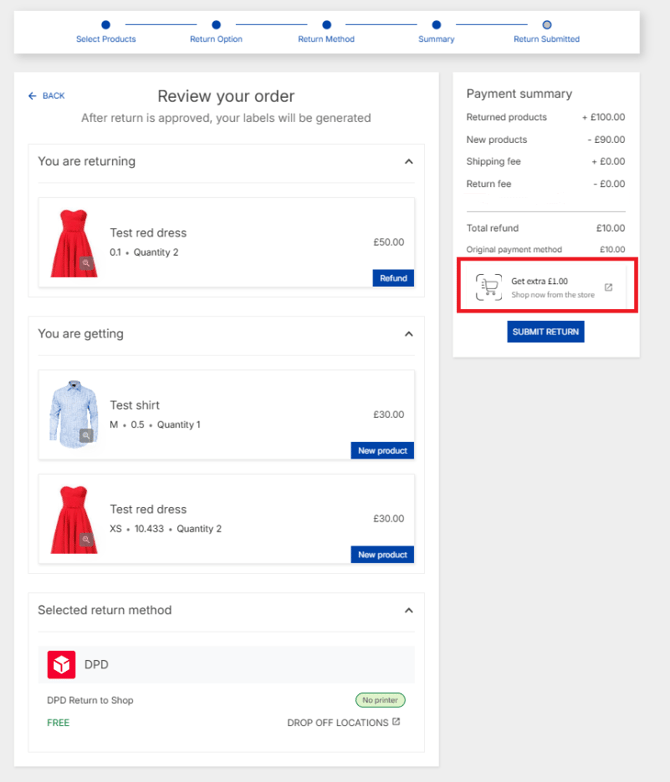
[Shop Now offer on Return summary page]
If bonus credit was used partially or fully, the original refund is fully consumed and no outstanding refund remains. At that point, the return continues as an exchange flow.
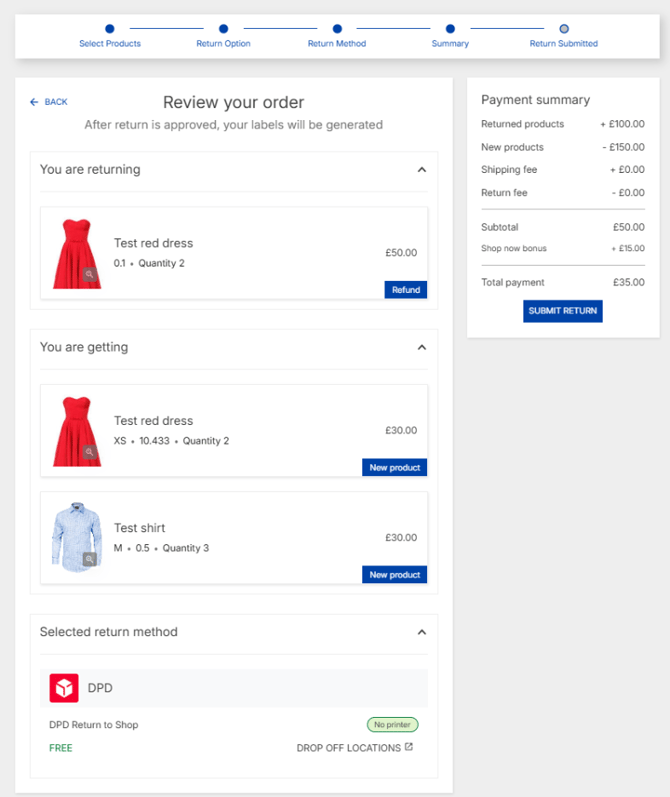
[Summary page – payment required]
Depending on whether Stripe integration is enabled:
- If Stripe is connected, customers can complete any additional required payment directly within the returns portal checkout flow. (Recommended)
- If Stripe is not connected, the return is submitted successfully, but any outstanding customer payment must later be collected outside ZigZag Returns & Exchanges (for example through a separately issued invoice).
For more details, see: [Link placeholder – Stripe Integration Guide]
Processing Shop Now returns
Once submitted, Shop Now products are treated operationally as Exchange items within ZigZag Returns & Exchanges.
The Shop Now bonus is applied as a discount distributed proportionally across all selected Shop Now items, taking into account item price and quantity. This ensures final balances remain accurate, and Shopify order totals remain consistent.
Because bonus calculations are tied directly to the selected products and return structure, submitted Shop Now returns have some intentional restrictions.
The return option cannot be changed manually on the Return Request page, and exchange product selections cannot be edited within Exchange Product Details. This prevents inconsistencies that would otherwise require recalculating bonus credit and rebalancing financial totals after submission.
Apart from the bonus and discount mechanics, Shop Now returns are processed in the same way as standard exchanges.
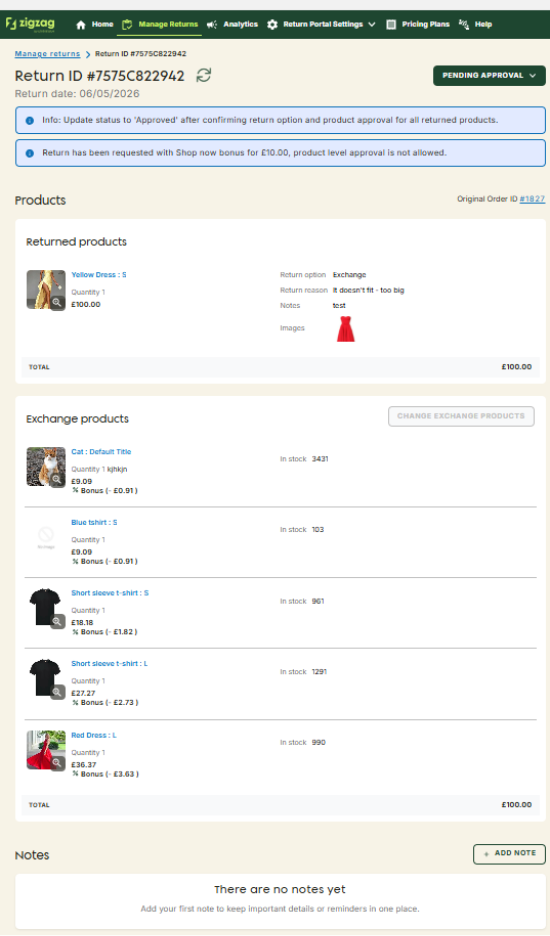
[Return with Shop Now products in Return request page]
Once approved, and the label is generated, respective return will be created in Shopify’s original order including exchange line items having the same discount amount.
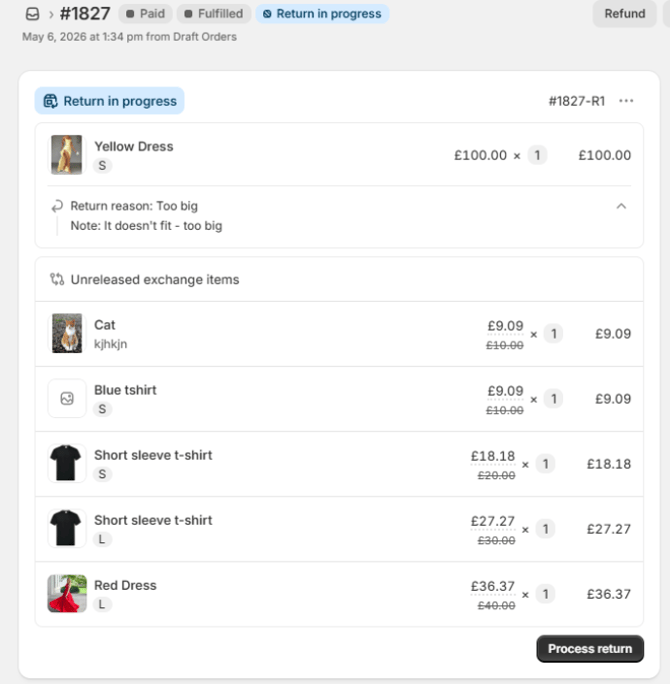
[Return with Shop now products in Shopify]
International returns
Shop Now products are technically treated as Exchange products, with the only difference being how they are selected by the customer and how promotional bonus credit is applied.
For this reason, if you want Shop Now to be available for international customers, International Exchanges must be enabled in your Exchange settings:
Returns Portal Settings → Return Options → Exchange Configurations
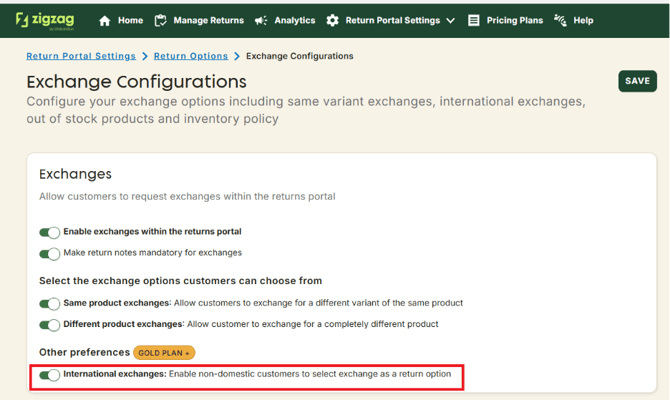
[International Exchanges setting]
ZigZag Returns & Exchanges also supports currency conversion for Shop Now.
All Shop Now configuration values in the app are entered using your shop currency. However, when international customers use the returns portal in a different local currency, ZigZag Returns & Exchanges automatically recalculates minimum refundable amount thresholds and bonus values on the backend so Shop Now eligibility and bonus credit are presented accurately in the customer’s local currency.
This ensures your customers always see correct balances and a consistent financial experience regardless of market.
Conclusion
Shop Now turns returns into a revenue retention opportunity.
Instead of losing sales through refunds, you can encourage customers to continue shopping by offering targeted incentives at key moments in the return journey. Flexible trigger timing, configurable bonus logic, Stripe payment support for balance collection, and seamless integration with your online store create a highly personalized and commercially effective returns experience.
For your customers, Shop Now makes returns feel less like a refund process and more like a guided shopping journey. For you, it improves retention, increases average order value, reduces refund outflow, and creates more opportunities to preserve revenue that would otherwise leave your business.
In short, Shop Now helps transform returns from a cost center into a growth channel.