![MasterLogo_DarkGreenZag_NoBackground.png]](https://my.zigzag.global/hs-fs/hubfs/MasterLogo_DarkGreenZag_NoBackground.png?height=30&name=MasterLogo_DarkGreenZag_NoBackground.png)
Meta description: Your returns portal depends on one setting matching perfectly between Shopify and ZigZag. Here's what the App Proxy URL actually does, and what breaks if it drifts out of sync.
Most settings in the app are forgiving — get one wrong, fix it, no harm done. The App Proxy URL isn't one of them. Get this one out of sync and your entire returns portal goes down, silently, until someone notices customers can't submit returns.
What is the App Proxy URL?
The App Proxy is what lets your returns portal live on your own domain, rather than redirecting customers to a separate third-party page. Technically, it's a Shopify configuration that maps a path on your store — like yourstore.com/a/returns — through to ZigZag, so the portal loads seamlessly as if it were a native part of your site.
It's built from two parts:
|
Part |
What it is |
Example |
|
Prefix |
A short segment, usually just a |
a |
|
Subpath |
The specific path for this app |
returns |
Together, they form your portal's live path — by default, /a/returns.
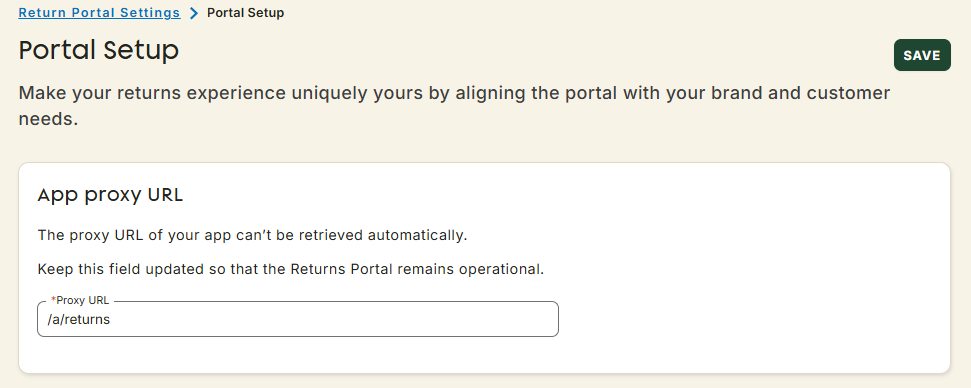
Why it needs to match exactly
This setting exists in two places, your Shopify admin, and inside the ZigZag app, and both need to say the same thing. Shopify doesn't push proxy changes to connected apps automatically, which is exactly what the warning on your Portal Setup page is telling you: "The proxy URL of your app can't be retrieved automatically. Keep this field updated so the Returns Portal remains operational."
What happens if they drift apart:
- The returns portal stops loading, customers hit a broken link instead of the returns flow
- This can happen silently. Nothing in Shopify actively warns you when the two no longer match, you typically find out from a customer support ticket, not a system alert
Common ways this happens:
- You (or an agency, or another app) change the proxy path directly in Shopify, for consistency with another app, to give the portal a different name, or because you migrated from a returns provider that already used the default path
- A theme or app migration resets proxy settings without you realising
Keeping them in sync
- In Shopify admin: go to Apps → App and sales channel settings → ZigZag Returns and Exchanges, and check the App Proxy URL under App Proxy.
- In the ZigZag app: go to Return Portal Settings → Portal Setup, and check the Proxy URL field matches exactly.
- If you change it in Shopify, update it here immediately, don't leave the two out of sync even temporarily.