![MasterLogo_DarkGreenZag_NoBackground.png]](https://my.zigzag.global/hs-fs/hubfs/MasterLogo_DarkGreenZag_NoBackground.png?height=30&name=MasterLogo_DarkGreenZag_NoBackground.png)
ZigZag Returns and Exchanges App allows you to create a branded returns portal, which you can then embed into your Shopify store and let customers return or exchange products effortlessly. You can add your returns portal URL to either the main navigation or footer of your Shopify store.
1. Log in to ZigZag Returns and Exchanges App and in the navigation bar, go to Return Portal Settings > Portal Setup.

2. Go to the Returns portal URL section and copy your returns portal URL.
Note: your returns portal URL needs to include /a/returns (e.g. yourstore.com/a/returns). This is the default path, you can customize it to something else, but whatever you set here has to match exactly with the link you add in your Shopify navigation (step 6).
Tip: You can also use your returns portal URL in your order confirmation emails to provide customers with a convenient way to initiate a return if needed. Maintaining transparency increases trust and helps you build a loyal customer base.
3. In your Shopify store admin panel, go to Online Store > Navigation

4. Decide whether you want to add your return portal page to the main menu or footer menu and select Add menu item.

5. In the pop-up dialog, enter the page title in the Label input field (for example, Start your return).
6. Paste your returns portal URL in the Link input field and Save to apply the changes to your selected menu. Double-check the URL you're pasting here includes the same /a/returns (or your custom path) you copied in step 2, if the two don't match, the menu link won't route customers to the portal.

7. View your online store and go to the returns portal. In the main menu, you will see Start your return.

Overwrite Return Period Feature
The Overwrite Return Period feature allows you to bypass the standard return deadline in certain cases, based on tags assigned to the products, orders, or customers. This means that even if the default return period has passed, returns can still be requested if the specific tags match. This feature is available for users on the Gold + pricing plan.
How It Works:
Let’s walk through an example of how the Overwrite Return Period works.
Return window is set to 11 days from the fulfillment date (see the image below).
Default Return Window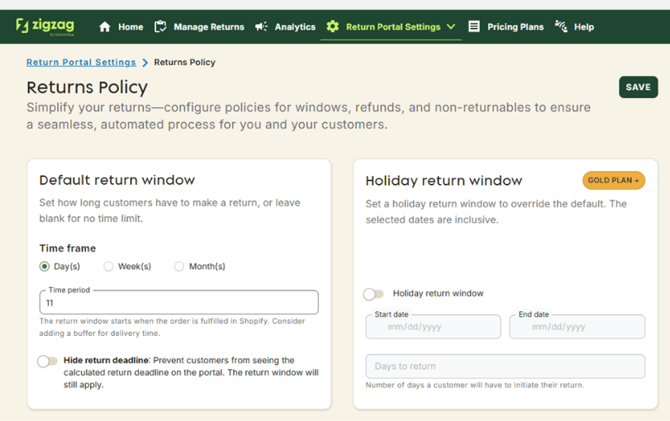
On the Return Policy page, you'll find a section where you can add tags for Products, Orders, and Customers. When any of these tags are applied to an order, product, or customer, the Overwrite Return Period feature will kick in, allowing a return to be requested even if the default return deadline has passed.
Overwrite Return Window Settings 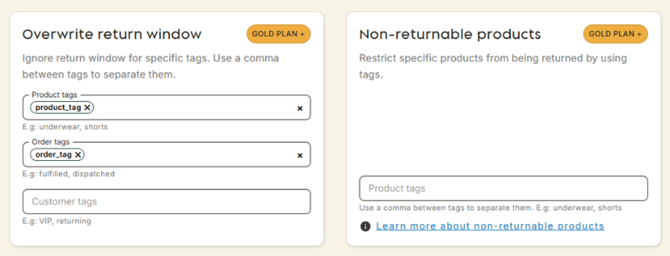
Example Scenario:
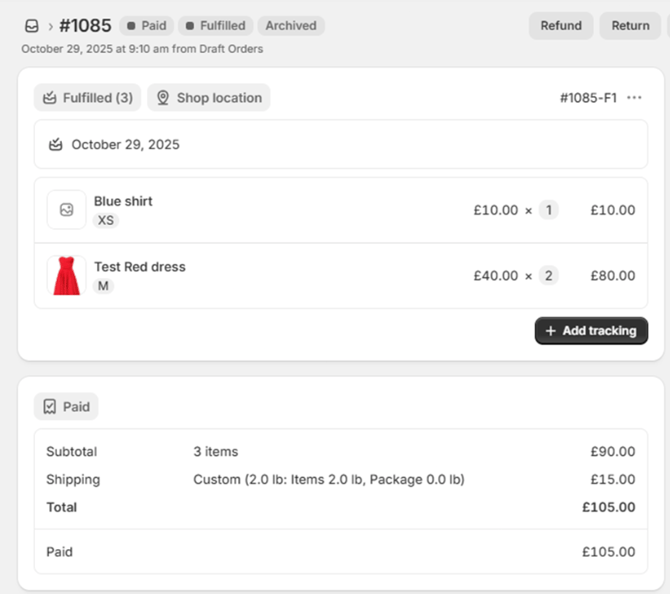
Let’s say an order is created and fulfilled on October 29, 2025. Given the 11-day return window setting, the default return deadline would be November 9, 2025.
Order Details
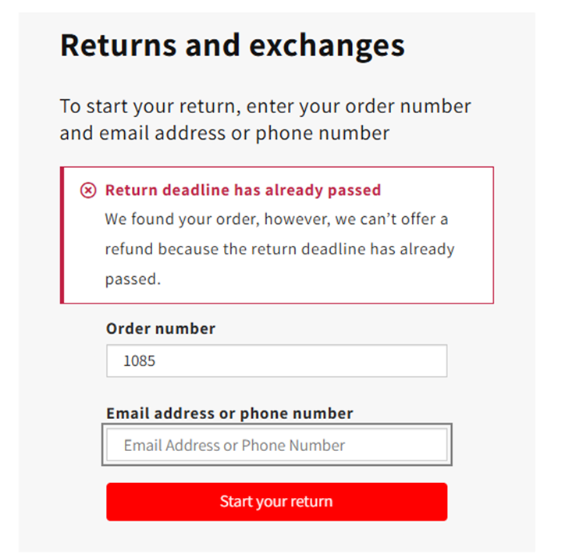
If the customer tries to submit a return request on December 12, 2025 – after the default return window has expired – the customer would typically receive an error stating that the return period has ended.
Error Message on Returns Portal
Skipping the Validation:
However, if the order, product, or customer has tags that match those specified in the Overwrite Return Period settings, the return request will be allowed, even if it’s outside the default window. This will bypass the validation and let the customer proceed with the return request without encountering an error.
Important Notes:
- The advanced rules feature will not apply if the Overwrite Return Period tags are eligible for that return.
- If an order contains products with overwrite tags and products without them, the validation will only be skipped for the products that have the overwrite return tags.
Upcoming Improvements:
Soon, we will be introducing enhanced functionality for the Overwrite Return Period feature. Not only will you be able to completely overwrite the return period, but you will also be able to apply specific return periods for products, orders, or customers based on the same tags. This means you can customize the return window per tag, offering even more flexibility for different categories of products or customer groups.
Use Cases:
This feature is particularly useful for managing returns for:
- Best customers: Allowing special return conditions for loyal customers.
- Specific products: For example, products that may have longer return windows due to special handling or shipping conditions.
- Special orders: Orders fulfilled or delivered under unique circumstances, such as promotional items or gift orders.
By leveraging this feature, you can customize return policies to meet your business needs while ensuring customer satisfaction.